Canonical Tags Overview
What canonical tags are, how they work, and how to use them correctly to avoid duplicate content issues.
Canonicalization is the process of selecting the “main” or “representative” URL version of a page.
A canonical URL tells search engines that this is the “standard” version of the page when there are multiple versions. All the other URLs with the same content are duplicates or similar versions of this standard page and must be ignored.
To tell search engines that a URL is canonical, you need to use canonical tags on all duplicate pages.
So, let’s dive into what this canonical tag is and why it’s so important.
What Is a Canonical Tag?
A canonical tag (rel=“canonical”) is an HTML code that helps search engines understand which URL is the preferred version of a page when there are multiple URLs with similar or duplicate content.
Here’s what the code sample looks like:
<link rel=“canonical” href=“https://xamsor.com/mainpage/” />And here’s how it looks on the page’s source code:

But Why Is It Important?
When search engines see multiple URLs with similar content, they might label them as duplicate content. And too much duplicate content lowers a site’s standing in Google’s eyes.
Not to mention, the website’s crawl budget gets too high. The more URLs a website has, the more the search engines need to crawl them. Search engines don’t like crawling unnecessary URLs since it puts a strain on crawling time and budget.
Another problem. A poor version of the page can be shown in the search results rather than the main page.
You can avoid all these problems with canonical tags.
Add the canonical tag on all these pages (including the main page). Search engines will identify the canonical URL as the main content page and ignore all the other versions when showing search results.
Here Is an Example of Duplicate URLs
Take an e-commerce website, for example. The site has different pages and URLs but with the same content.
For the same e-commerce site (I have taken a dummy sitename), duplicate pages with the same or similar content can look like this:
- Main URL:
https://footwearshop.com/running-shoes/nike-air-zoom- Duplicate page created through another category:
https://footwearshop.com/nike/nike-air-zoom- Duplicate URLs created by layered navigation:
https://footwearshop.com/running-shoes/nike-air-zoom?color=redhttps://footwearshop.com/running-shoes/nike-air-zoom?size=10https://footwearshop.com/running-shoes/nike-air-zoom?sort=price-asc- Protocol variant with www and HTTP versions:
http://footwearshop.com/running-shoes/nike-air-zoomhttps://www.footwearshop.com/running-shoes/nike-air-zoomhttp://www.footwearshop.com/running-shoes/nike-air-zoom- Parameterized URLs:
https://footwearshop.com/running-shoes/nike-air-zoom?utm_source=newsletterhttps://footwearshop.com/running-shoes/nike-air-zoom?affiliate=123https://footwearshop.com/running-shoes/nike-air-zoom?sessionid=XYZ123https://footwearshop.com/running-shoes/nike-air-zoom?search=red+running+shoesAll these URLs have the same content as the main page.
So, you need to add an HTML code to the page header. In this case, the code reads like this:
<link rel=“canonical” href=“https://footwearshop.com/running-shoes/nike-air-zoom” />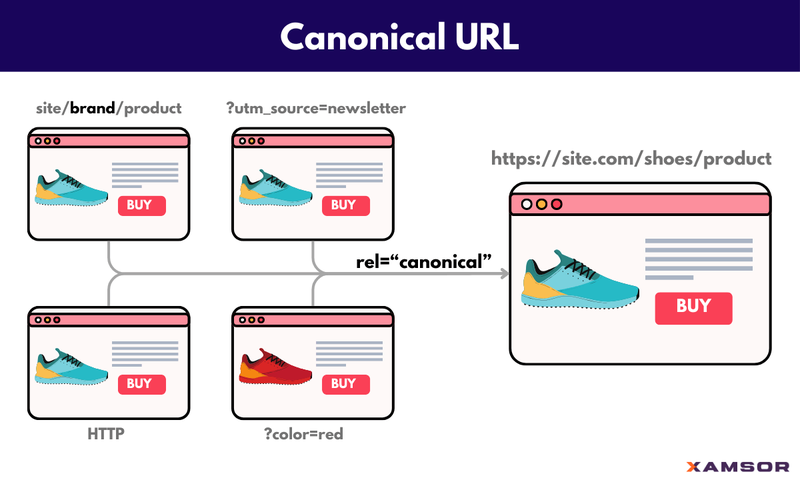
With the canonical tag, you are telling Google and other search engines that this is the page’s preferred version and to ignore other URLs with the same content.
If You Don’t Provide a Canonical URL, Google Picks One
When multiple URLs have the same content, Google picks up the URL with the canonical tag.
But what if there are no canonical tags?
As John Mueller explains in this video, Google picks a canonical URL by itself if there are no URLs with canonical tags. These are the factors it looks for while choosing the one:
- URLs in the sitemap: The URL appearing on the sitemap is selected as the canonical URL.
- Internal linking and redirects: Google looks for internal links and URL redirects to determine the main version of a page.
- HTTPS URLs: If the duplicate pages are because of protocol variants, Google picks the HTTPS URL as the canonical page.
- “Nicer” looking URLs: Structured and neat-looking URLs are preferred over parameterized URLs.
- User signals: Lastly, Google also looks for user preferences and which URL seems valuable to the user.
How to Implement Canonicals
You can add a simple HTML code in the section of all the duplicate pages.
In the above example, the code you need to add is:
<link rel=“canonical” href=“https://footwearshop.com/running-shoes/nike-air-zoom” />You can also add the same HTML code on the main page. The canonical tag on the main (canonical) page is called a self-referential canonical tag—which is a good practice.
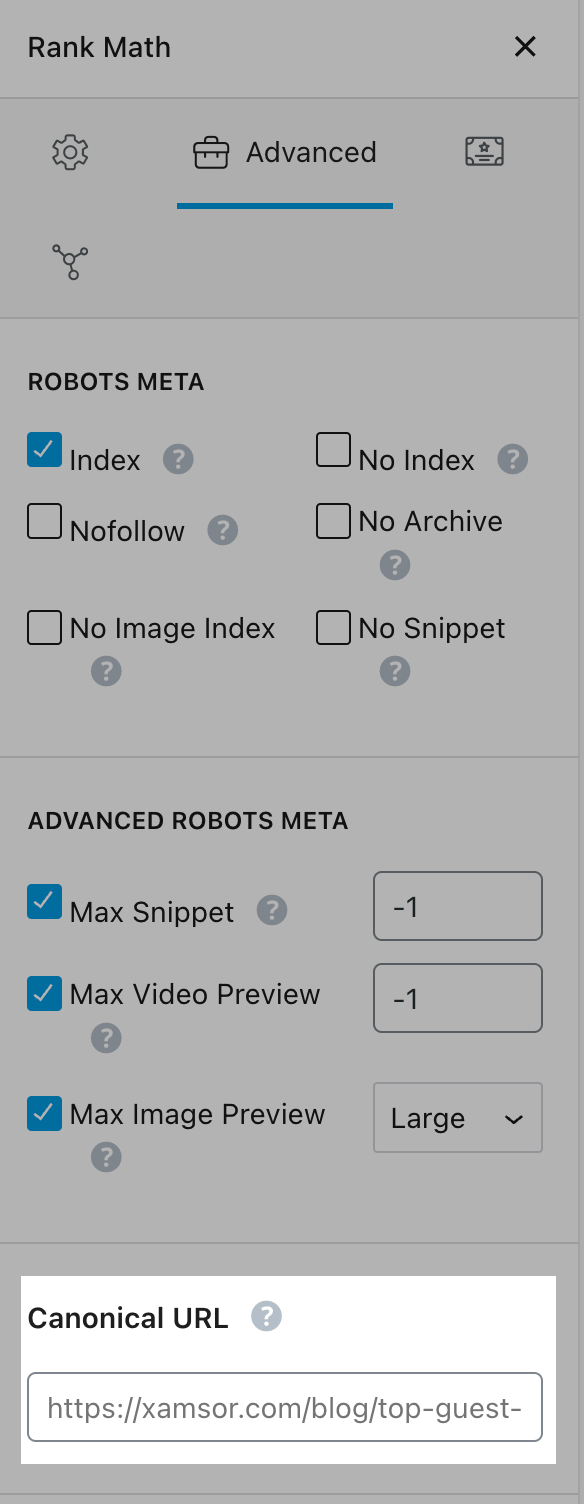
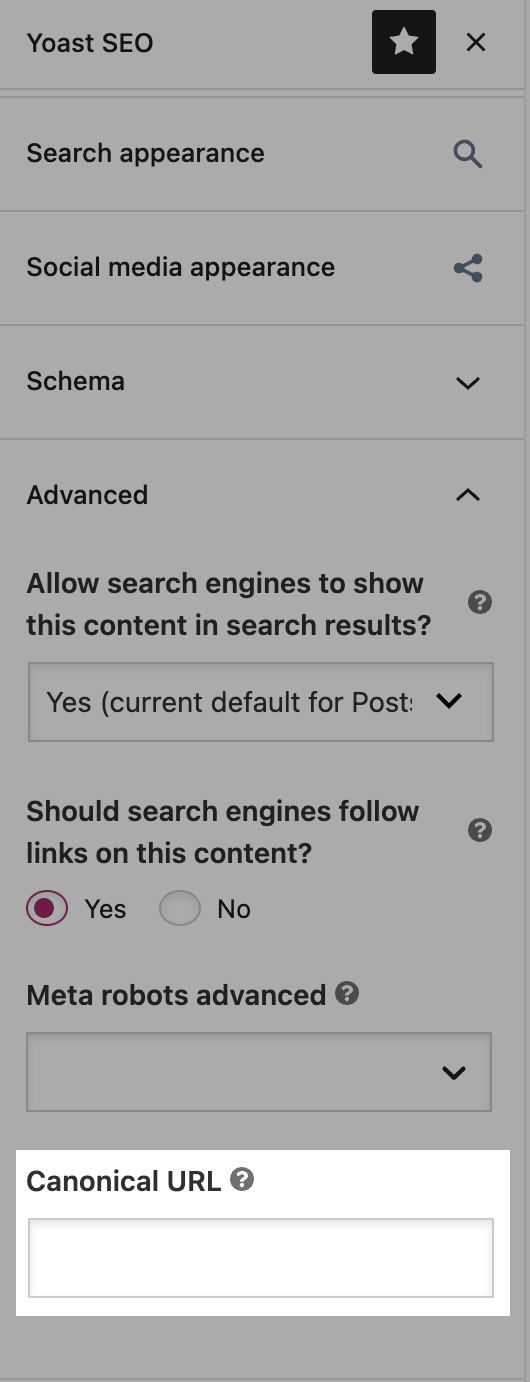
If you use a CMS, SEO plugins like RankMath and Yoast SEO help you create canonical tags without the need to code.
Rank Math:
In the post/page editor, you can head to the Rank Math section, click the Advanced tab, and specify the canonical URL.
Yoast SEO:
You can do the same with Yoast SEO. Go to the Advanced menu and enter the canonical URL.
Another best practice is to remove non-canonical pages from the sitemap.
Make sure only the canonical pages are on your sitemap. While this doesn’t guarantee Google will only pick up the sitemap URLs, it helps Google crawlers identify the main pages.
When to Use Canonical Tags and When to 301 Redirect
It can get confusing when to use canonical tags and when to 301 redirect.
A 301 redirect is a permanent redirect from one URL to another. It tells the search engine and the user that a page has permanently moved to a new location. The old URL no longer exists.
With canonical tags, multiple URLs co-exist, but search engines consider only one of them as the main page.
So, when to use which?
The thumb rule is:
If you want the URL page to be accessible to the user, you use canonical tags. If you don’t want the URL page to exist, you 301 redirect it to the target page.
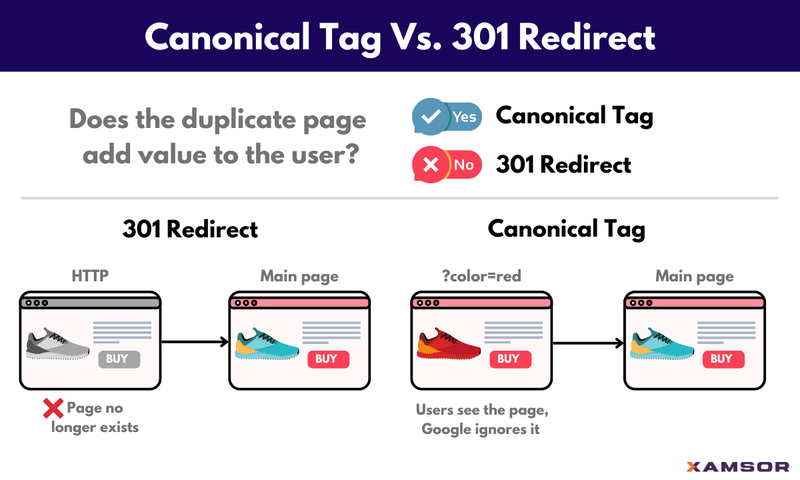
For example, you usually don’t want HTTP versions of your pages. You 301 redirect them to the page’s HTTPS URL.
On the other hand, you want layered navigation (sorts, filters) and parameterized URLs to exist. But don’t want the search engines to rank them. So, you use canonical tags on these pages to highlight the canonical URL.
Do’s and Don’ts with Canonicalization
Here are some do’s and don’ts of canonicalization:
- Use self-referencing canonical tags, i.e., canonical tags on the canonical page.
- Always canonicalize pages with URL parameters.
- Don’t canonicalize pages with entirely different content.
- Use only one canonical tag per page. Don’t use multiple canonical tags on a single page.
- Use complete URL paths while using canonical tags, not relative. href=“https://footwearshop.com/running-shoes/nike-air-zoom/” is good, href=“/running-shoes/nike-air-zoom/” – not so much.
- Make sure canonical URLs are indexable on the sitemap. Even better, remove non-canonical URLs from the sitemap or no-index them.
- If you want the duplicate page to exist, use canonicalization. If you do not want it to exist and it serves no value to the user, consider 301 redirecting it to the canonical page.
Have something to say? Join the discussion on LinkedIn or subscribe to stay tuned:

Max Roslyakov
Founder, Xamsor