Content Audit: The Complete Guide
How to audit and refresh existing content for faster traffic gains, with real examples showing 30-76% growth.
Refreshing the existing content will bring you more traffic than creating new pages.
It’s true in 90% of cases, especially for websites older than two years.
For example, Smash Digital saw a 76.54% increase in site-wide organic traffic after deleting outdated content and updating existing articles.
The best part about content audits is that traffic from refreshed content will rise within 3-4 days, while new content usually takes weeks to rank and bring some clicks.
Ahrefs overhauled their “Top Google Searches” post with new search data and saw a rapid increase of over 3,000 monthly visits almost immediately.
That’s why every experienced SEO will start their work on a website from the content audit. It’s the best way in SEO to show fast and impressive results.
How to Conduct A Comprehensive Content Audit
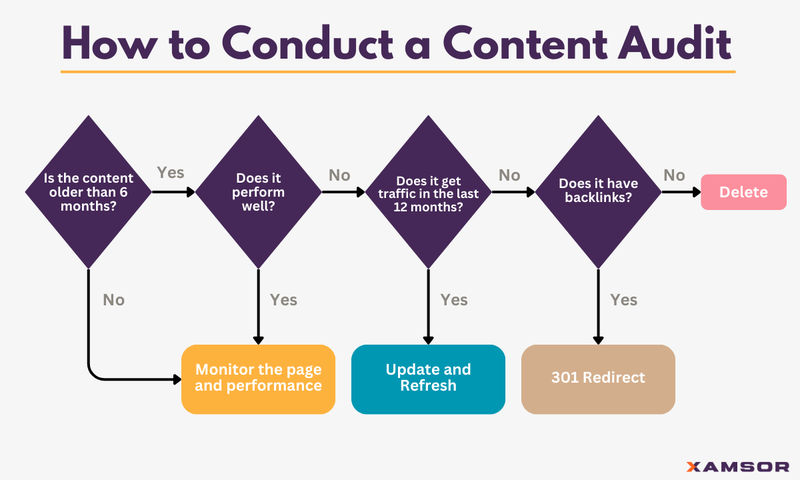
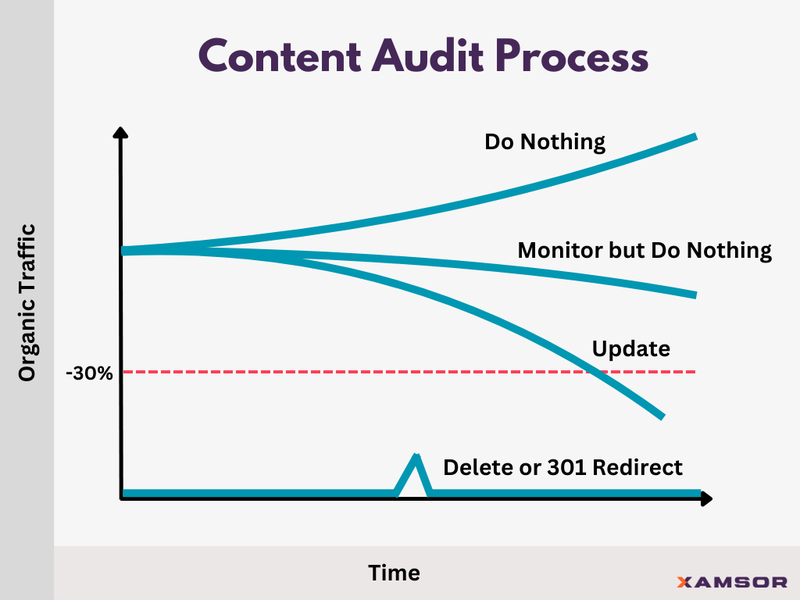
When performing a content audit, you can either delete or redirect it, update it, or do nothing and wait longer to see if it performs. Here’s the process that works for us:
 Content audit process
Below, we’ll uncover how to group your content into each bucket and explain what strategies you can use in more detail during the content audit process.
Step #1: Group Posts Into an Action Item Bucket
The content audit process begins by evaluating each piece of content and assigning it to one of four action item buckets:
- Bucket One: Delete
- Bucket Two: 301 Redirect
- Bucket Three: Update and Refresh
- Bucket Four: Monitor but Do Nothing
We’ve broken it down to make it easy for any website owner to follow. Here’s how the process works:
1. Consider Content Age
First, we check the age of a page or piece of content. If it’s less than six months old, it automatically gets put into bucket four.
For now, monitor the page but do nothing. This is because the content is too fresh to evaluate and hasn’t had enough time to perform or give us usable data for analysis.
Content older than six months moves to the next step in the evaluation process.
2. Assess Content Performance
Our method for evaluating performance is simple. Compare the total clicks in the last 90 days to the previous 90 days.
If clicks have increased, remained steady, or decreased by less than 30%, you can do nothing. Put the URL into bucket four to monitor.
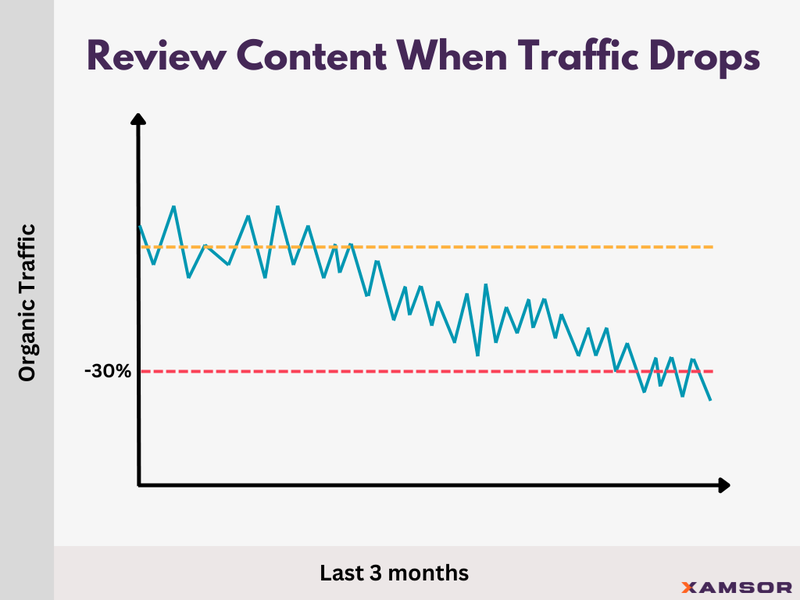
However, if clicks have declined by 30% or more (with a minimum of 10 clicks), we need to dig a little deeper.
3. Analyze Content Traffic
Next, check your declining content’s traffic (organic, paid, social, etc.) over the last 12 months.
If the content has positive traffic figures, it’s ready for an update and refresh. Move it to bucket three. If a piece of content has had no traffic over the past 12 months, there is another metric to consider before deleting it.
4. Check the Post’s Backlinks
The next step is to look at the backlink profiles for your content. If a post does not have valuable backlinks that improve your site, it can be deleted and assigned to bucket one.
Move the zero traffic content with backlinks to bucket two. You should 301 redirect these pages to another relevant piece of content that is currently ranking well.
After this step, all your content should be assigned a bucket. Now, we can walk through the process of finding the data you need to make this possible.
Step #2: Get Google Search Console Data
To get started, go to Google Search Console and log in. Locate the “Performance” tab and click “Search results” to view your website’s search traffic data.
Before exporting the data, change the date range to “Compare last 3 months to previous period” and click Apply.
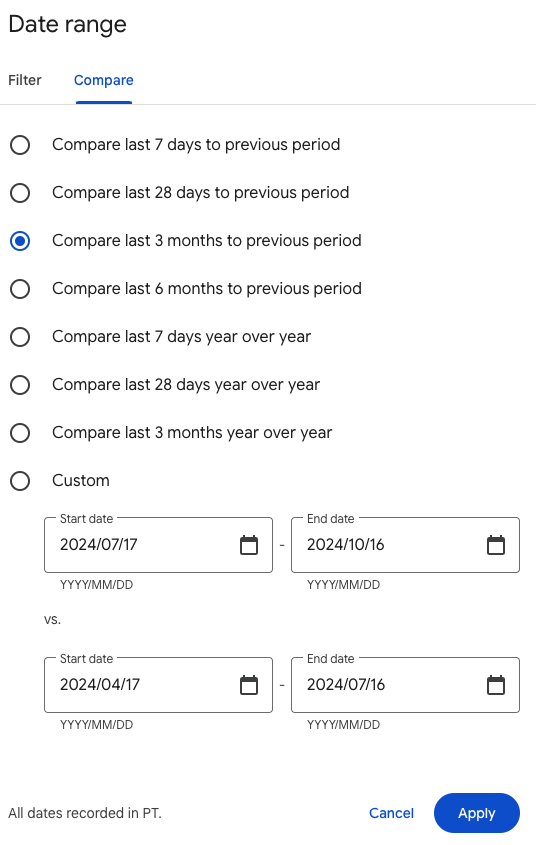
From here, you can export the data to a spreadsheet for further analysis.
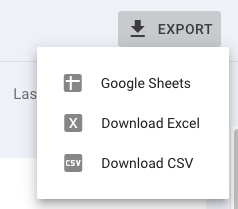
Save this data somewhere. Before we move to the next step, we can also generate our 12-month traffic reports, which we’ll need while evaluating content and moving pages into buckets.
Go to the date range, select “Last 12 months,” and click Apply. Export this data into Excel or Google Sheets.
Exported GSC data will look like this:

But we’re still not done yet. What if we have declining content with zero traffic? Then, we’ll need backlink data to decide what to do with a post.
Look for the “Links” section on the sidebar to find this data in GSC.
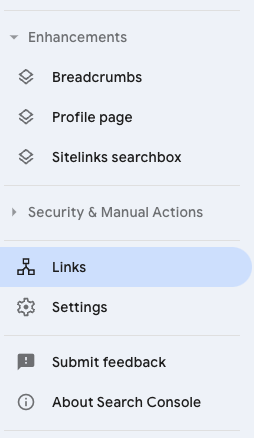
From there, you’ll see an External Links Report. Click “More >” to see all of your site’s backlinks. This list will be sorted by pages with the most backlinks to the fewest. Export the data to a spreadsheet.
With this, we can clean up the data, sort it accordingly, and start analyzing our content to highlight action items, which we cover in more detail below.
Step #3: Create Action Items
Using our content audit template is the best way to start finding and moving actual pieces of content to their appropriate content audit buckets.
All data will need to conduct a full content audit has already been downloaded. Our template allows you to consolidate everything into one place, including:
- Page URL
- Page Title
- # of Backlinks
- Unique Visitors
- Total Clicks
- Click Difference
- Action Items
Here’s an example of our content audit. Of the 15 posts we audited, we found:
- Eight were performing well. No changes are needed. We will do nothing and monitor these moving forward.
- Three posts need to be updated. They still have strong traffic, but clicks have declined.
- Three posts need to be deleted. They have no backlinks or traffic.
- One post needs a 301 redirect. Although the backlinks are strong, the post no longer ranks, and traffic has sunk to zero.
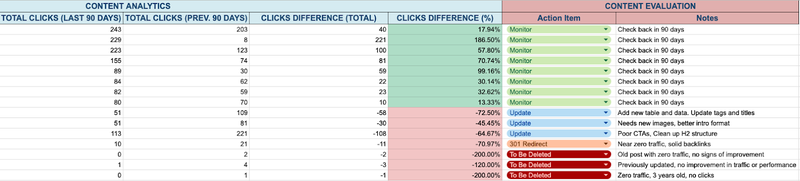
Follow this same process with your own content. Include as many pages and posts as possible to get the best results from your content audit.
Step #4: Delete or 301 Redirect Low Performing Content
Deleting content should be the priority before moving into redirects and content updates. First, locate all URLs marked for deletion in your spreadsheet and remove them from your website. Larger site owners will benefit from a bulk delete feature.
SEO Consultant Francesco Baldini tested this strategy with a client who had approximately 5,000,000 pages on their website. However, most were generating zero traffic and not ranking for any keywords.
In an extreme move, they deleted 99.9% of posts and kept the 1,500 pages that were ranking and generating traffic (and conversions). The results?
Organic traffic increased by 160% in just three months, and organic search sales increased by 105%. However, this is not an endorsement to delete 99.9% of the pages on your website.
When it comes to content, less can often be more.
This also applies to the 301 redirect strategy we’ve outlined. Because of the page’s backlinks, you can 301 redirect the old URL to a similar page that’s performing well.
Here’s an example from Exploding Topics: an article about generative AI market size is now 301 redirected to another about generative AI statistics.
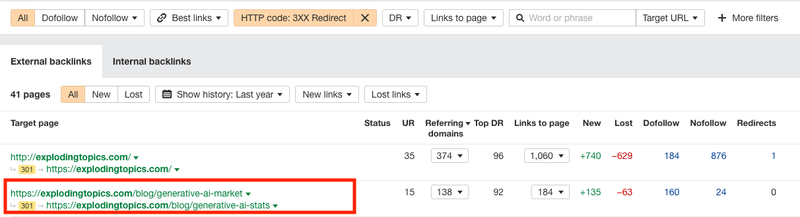
Every piece of content on your site should serve a purpose and provide value to your audience. If it’s not doing that, it’s time to delete or redirect it.
Step #5: Update and Refresh Underperforming Content
Now that we’ve analyzed our content, deleted poorly performing pages, and assigned our 301 redirects, it’s time to identify articles needing an update and implement the improvements.
Sorting the update bucket by traffic potential is how you can decide which posts need the most attention first. In the Google Sheets template, you should sort by “A to Z” in the “Clicks Difference (Total)” column.

At the top of the table, you can see one post declined from 221 clicks to 113 clicks. We should focus on this post first, working our way down the list because these posts have the most traffic potential to recover.
Single Grain implemented this content audit practice and updated 42 blog posts over a six-month period, resulting in a 96% increase in traffic.
Of the updated posts, 25 generated more traffic, while 17 saw a decline. The total traffic for these posts jumped from 9,207 visits to 18,030 visits, gaining 8,823 monthly visits.
They also revealed that posts with existing traction (over 20 monthly visits pre-update) performed significantly better, contributing to 85.2% of the traffic increase.
Content Audit Template
Auditing your blog content is an ongoing process. This includes keeping an eye on posts that are already doing well and taking note of any changes that occur from content updates.
Our content audit template will streamline the process and help you track key metrics, content improvements, and traffic changes in one place.
You can access this free template here.
Content Audit Checklist
When it’s time to implement action items, there are a few things you need to remember to perform a content audit successfully. This checklist includes the three primary areas to focus on to see results.
1. Update Information, Data, and Statistics
Outdated information can harm your credibility and SEO performance. Updating article information, data, and statistics is the most impactful way to breathe new life into your existing content.
Exploding Topics uses this strategy to keep its content relevant with the latest data. For example, they overhauled two posts last month and saw organic traffic increase by 7,200 visits to these pages.

To see similar results, start by fact-checking all information in your content. Use reputable sources to confirm that your data is still accurate.
Replace outdated numbers with the latest available data. For instance, if you’re discussing industry trends, you should include the most recent statistics supporting your claims.
Lastly, swap out old examples for more current and relevant ones. This helps your content resonate with today’s audience and keeps your piece feeling fresh and relevant.
2. Adjust the Content Structure
Content structure impacts readability and the overall user experience. For example, large walls of text can be intimidating and off-putting to readers.
Instead, try to divide content into smaller, more digestible paragraphs. Aim for 2-3 sentences per paragraph to make your content more approachable and easier to read.
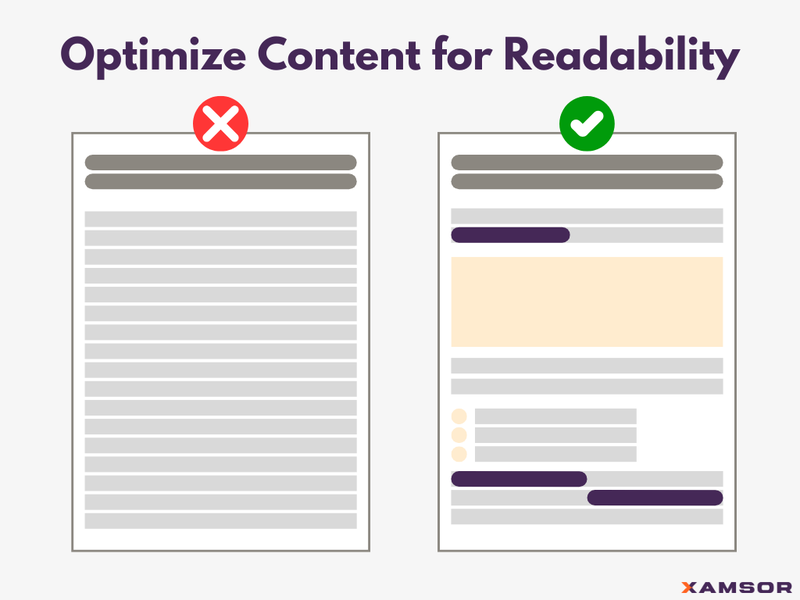 Break down walls of text into readable chunks
Refine headings to better guide readers through your articles. They should be descriptive enough to give readers an idea of what each section contains. Use H2 and H3 tags to create a clear hierarchy in your content.
Breaking up content blocks with bullet points and numbered lists can also increase readability. This is one of many content updates included in Backlinko’s ranking factors study.
3. Fix Internal and External Links
Broken links can harm user experience and SEO performance. To avoid this issue, you should regularly audit your site using tools like Screaming Frog or Google Search Console to identify and fix broken links.
As you create new content or update existing articles, you can look for opportunities to link to your existing pages.
Your anchor text should give readers (and search engines) a clear idea of the linked page’s content.
 Google’s guidelines on internal linking
However, remember to avoid overloading one page with too many links. The most important aspect of internal linking is relevancy.
Implementing a Content Audit That Yields Results
You’re now equipped with the tools and knowledge to conduct impactful content audits. From setting clear objectives to using powerful audit tools, you have a roadmap for success.
Remember, the true value lies in acting on your findings. Prioritize high-impact changes, make audits a regular practice, and use insights to inform your broader strategy. Don’t wait – start your audit today and watch your rankings and organic traffic rise.
To speed up this process, you can check out our Content Audit Tool (CAT) to automate your entire site content audit.

Max Roslyakov
Founder, Xamsor